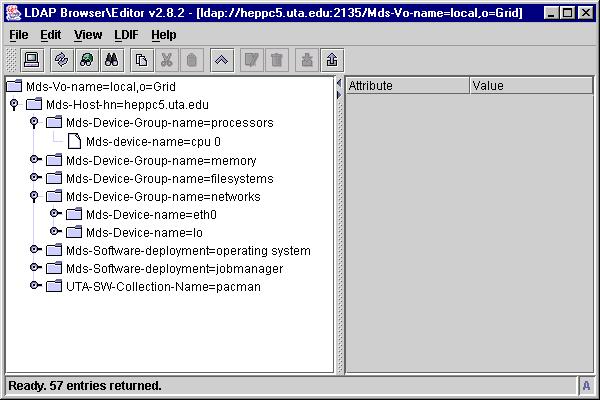
Figure 1.
Pippy is an information provider compatible with the Monitoring and Discovery Service (MDS) of the Globus Toolkit and the Pacman software package installer from Saul Youssef at Boston University. Pippy can read pacman databases and generate appropriate LDAP entries for installed software packages that are compatible with MDS. Once installed, pippy becomes part of the host's Grid Resource Information Service (GRIS). By integrating information about the installed software base of grid nodes into the MDS one can make "better" decisions about where to start, or move, computational tasks in a grid environment. This document will explain how a pacman package is mapped to an LDAP entry, where the entry appears in the Directory Information Tree (DIT) maintained by the GRIS, and the command line arguments of pippy.
Pippy is supplied as a pacman package available at the following cache:
http://www-hep.uta.edu/pacman
Newer versions of pacman include this site in the list of trusted caches.
The distribution includes a README file available here.
GRIS, implemented as a custom backend to the OpenLDAP's slapd server, allows one to add data to the existing store of information maintained by the GRIS by creating information providers (IPs). For an IP to work within the GRIS, it simply prints LDAP entries in the LDAP Data Interchange Format (LDIF). At appropriate times GRIS will run the IP and collect its LDIF output and add the entries to the DIT maintained by GRIS. The MDS does not maintain a backing store for the DIT, rather, all entries are kept within in-memory caches. When the portion of the DIT maintained by GRIS becomes stale, GRIS will execute the information providers to regenerate the DIT.
Pacman is a software package management system useful for grid environments. It eases the deployment and maintenance of software packages by using software caches. Pacman maintains a database of which software packages have been installed on a system and which software cache provided the package. One difference between pacman and other systems, most notably rpm, is that the packager can specify environment variables and values that should exist within a user's environment for the package to function along with a set of commands that should be executed prior to the package's use. Pacman maintains a file that a user can source to have the information automatically included.
The following table lists the mappings from the attributes in a .pacman
file and the LDAP attributes used by pippy
| .pacman Attribute | Meaning | LDAP Attribute |
| name | The name of the software package | UTA-SW-Package-Name |
| description | A short description of the package | UTA-SW-Package-Description |
| url | generic web site for the package | labeledURI |
| source | URL to pull package from | labeledURI |
| systems | mapping from platform names to specific files and
installation directories |
|
| depends | packages that must be installed before this package | |
| exists | list of pathnames that must exist in the local file system before installation | |
| inpath | list of entries that must be found using which before installation | |
| bins | list of executables that will be installed in /usr/local/bin | |
| paths | list of environment variables that will be modified | UTA-SW-Package-Enviro-Prepend |
| enviros | list of environment variable that will be modified | UTA-SW-Package-Enviro-Set |
| localdoc | web-based documentation files installed on local file system | |
| daemons | names of daemon processes that will be started | |
| install | commands used to install the package | |
| setup | commands used to setup the package for use | UTA-SW-Sequenced-Setup-Command |
| demo | pathname to a demonstration of the package | |
| path to a local pacman maintained file that can be sourced to modify user's environment | UTA-SW-Package-Source-File |
Notes:
(1) All schema elements, with the exception of labeledURI, are defined
in pip.schema. labeledURI is provided by OpenLDAP's core.schema normally
found at $GLOBUS_LOCATION/etc/openldap/schemas/core.schema
(2) UTA-SW-Package-Enviro-Prepend, UTA-SW-Package-Enviro-Set and UTA-SW-Sequenced-Setup-Command are multi-valued attributes.
(3) UTA-SW-Package-Source-File points to a file maintained by pacman
for all installed packages. It will modify the user's environment
with the values of
the attributes listed in note (2).
In LDAP entries entered into the DIT form a hierarchy similar to the way that files are organized on a computer. Unlike filesystems LDAP does not have directories, per se, rather, an entry can be either a leaf or a branch in the DIT. In the screen-shot below, one sees that there is an entry named "Mds-vo-name=local,o=Grid" that has 1 child entry whose relative name is Mds-Host-hn=heppc5.uta.edu. The fully qualified name of this child entry is called its distinguished name (dn) and is comprised of two parts; its relative distinguished name (rdn) and the dn of its parent. For the example given the rdn is Mds-Host-hn=heppc5.uta.edu and the parent's dn is Mds-vo-name=local,o=Grid". Thus the dn of the entry is "Mds-Host-hn=heppc5.uta.edu,Mds-vo-name=local,o=Grid". In the default setup of the GRIS all information about a host is placed below this entry. The figure shows a number of entries with varying rdn's based on the Mds-Device-Group-name attribute.
The diagram also shows the how the DIT can be used to group similar
information. In GRIS all of the entries describing network interfaces
are located below the Mds-Device-Group-name=networks entry. The diagram
shows two such entries, one for the eth0 interface and one for the lo interface.
Similarly pippy creates an entry under which is all the information about
installed software packages. By default the collection has the rdn
of UTA-SW-Collection-Name=pacman while the dn would be "UTA-SW-Collection-Name=pacman,Mds-Host-hn=heppc5.uta.edu,Mds-vo-name=local,o=Grid".
Figure 1.
In the left half of figure 2. one can see a number of packages stored under pippy's default collection. The right half of the same figure shows the information provided for the vrvs-vic-2.9.1-1 package.
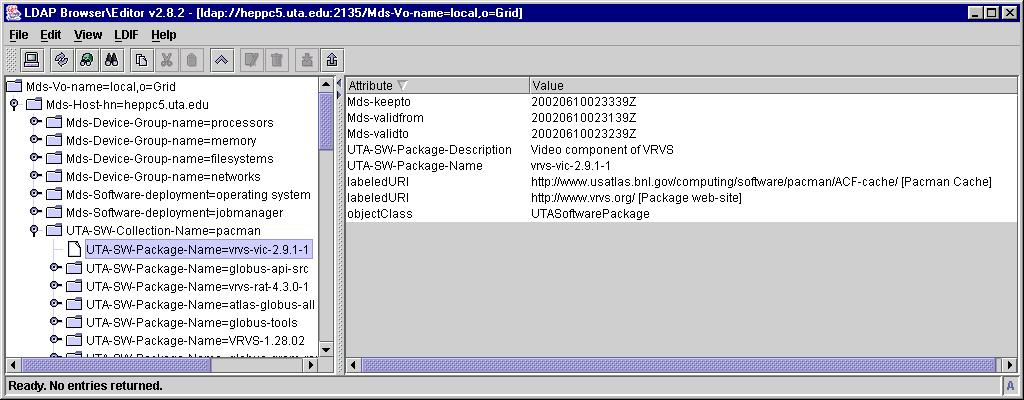
Figure 2.
I have constructed a mythical pacman database that includes nearly all
available packages from the trusted caches mentioned on the pacman web-page.
If you have a GUI
based ldap browser such as shown in figures 1. and 2., you can review
how various packages are represented in the MDS. The entries are
available via
ldap://heppc5.uta.edu:2135 all of the entries are under the following
dn: "UTA-SW-Collection-Name=pacman,Mds-Host-hn=heppc5.uta.edu,mds-vo-name=local,o=grid"
You can review the information via grid-info-search by using the following command:
grid-info-search -x -h heppc5.uta.edu -p 2135 -b "UTA-SW-Collection-Name=pacman,Mds-Host-hn=heppc5.uta.edu,mds-vo-name=local,o=grid"
The output of the previous command is available here.
Pippy is a python program that is executed from within the GRIS backend. The program takes a number of command line arguments that are specified by an entry in $GLOBUS_LOCATION/grid-info-resource-ldif.conf (once pippy has been installed). Pippy can be executed outside of GRIS provided that one provides the program with the needed command line arguments. Pippy's signature is:
pip.py [-d 1]
# prints messages to standard error
[--ttl n]
# the length of time in seconds that entries should be valid for
[--cache n]
# the recommendation to GRIS in seconds on how long to keep entries
--base
base_dn # the dn of the parent for the UTASoftwareCollention
object
--collection
name # the text for the UTA-SW-Collection-Name attribute
file1 file2
... # pathnames to pacman databases
During execution pippy will report errors, and eventually debug information,
to the LOG_USER facility of syslogd with a prefix of pip.py
The -d 1 option has been implemented so that messages that go to syslog
are also printed to standard error.
Any and all comments on pippy or this documentation would be greatly appreciated. Send to mcguigan@hepmail.uta.edu